Configuring Environment Variables
The following environment variables need to be set in order to use the CoraDB. The necessary environment variables are automatically set when the CoraDB system is installed or can be changed, as needed, by the user.
CoraDB Environment Variables
CoraDB: The default environment variable that designates the location where the CoraDB is installed. This variable must be set accurately since all programs included in the CoraDB system uses this environment variable as reference.
CoraDB_DATABASES: The environment variable that designates the location of the databases.txt file. The CoraDB system stores the absolute path of database volumes in the $CoraDB_DATABASES/databases.txt file. See databases.txt File.
CoraDB_MSG_LANG: The environment variable that specifies usage messages and error messages in CoraDB. The initial value upon start is not defined. If it is not defined, it follows the configured locale when createdb. For more information, see Language & Charset Setting.
Note
A user of CoraDB Manager should specify CoraDB_MSG_LANG, an environment variable of DB server node into en_US to print out messages normally after running database related features. However, database related features are run normally and just the output messages are broken when CoraDB_MSG_LANG is not en_US.
To apply the changed CoraDB_MSG_LANG, CoraDB system of DB server node should be restarted(coradb service stop, coradb service start).
CoraDB_TMP: The environment variable that specifies the location where the cora_master process and the cora_broker process store the UNIX domain socket file in CoraDB for Linux. If it is not specified, the cora_master process stores the UNIX domain socket file under the /tmp directory and the cora_broker process stores the UNIX domain socket file under the $CoraDB/var/CoraDB_SOCK directory (not used in CoraDB for Windows).
CoraDB_TMP value has some constraints, which are as follows:
Since the maximum length of the UNIX socket path is 108, when a path longer than 108 is entered in $CoraDB_TMP, an error is displayed.
$ export CoraDB_TMP=/home1/testusr/coradb=/tmp/123456789012345678901234567890123456789012345678901234567890123456789012345678901234567890123456789
$ coradb server start apricot

The $CoraDB_TMP is too long. (/home1/testusr/coradb=/tmp/123456789012345678901234567890123456789012345678901234567890123456789012345678901234567890123456789)
When the relative path is entered, an error is displayed.
$ export CoraDB_TMP=./var
$ coradb server start testdb

The $CoraDB_TMP should be an absolute path. (./var)
CoraDB_TMP can be used to avoid the following problems that can occur at the default path of the UNIX domain socket that CoraDB uses.
/tmp is used to store the temporary files in Linux. If the system administrator periodically and voluntarily cleans the space, the UNIX domain socket may be removed. In this case, configure $CoraDB_TMP to another path, not /tmp.
The maximum length of the UNIX socket path is 108. When the installation path of CoraDB is too long and the $CoraDB/var/CoraDB_SOCK path that store the UNIX socket path for cora_broker exceeds 108 characters, the broker cannot be executed. Therefore, the path of $CoraDB_TMP must not exceed 108 characters.
The above mentioned environment variables are set when the CoraDB is installed. However, the following commands can be used to verify the setting.
Linux
% printenv CoraDB
% printenv CoraDB_DATABASES
% printenv CoraDB_MSG_LANG
% printenv CoraDB TMP
Windows
C:\> set CoraDB
OS Environment and Java Environment Variables
PATH: In the Linux environment, the directory $CoraDB/bin, which includes a CoraDB system executable file, must be included in the PATH environment variable.
LD_LIBRARY_PATH: In the Linux environment, $CoraDB/lib, which is the CoraDB system’s dynamic library file (libjvm.so), must be included in the LD_LIBRARY_PATH (or SHLIB_PATH or LIBPATH) environment variable.
Path: In the Windows environment, the %CoraDB%\bin, which is a directory that contains CoraDB system’s execution file, must be included in the Path environment variable.
JAVA_HOME: To use the Java stored procedure in the CoraDB system, the Java Virtual Machine (JVM) version 1.6 or later must be installed, and the JAVA_HOME environment variable must designate the concerned directory. See the Configuring for CoraDB Java SP Server.
JVM_PATH: To use the Java stored procedure in the CoraDB system, the JVM_PATH environment variable can specify the JVM library (libjvm) path explicitly instead of finding the library from JAVA_HOME. See the Configuring for CoraDB Java SP Server.
Configuring the Environment Variable
For Windows
If the CoraDB system has been installed on Windows, then the installation program automatically sets the necessary environment variable. Select [Systems Properties] in [My Computer] and select the [Advanced] tab. Click the [Environment Variable] button and check the setting in the [System Variable]. The settings can be changed by clicking on the [Edit] button. See the Windows help for more information on how to change the environment variable on Windows.
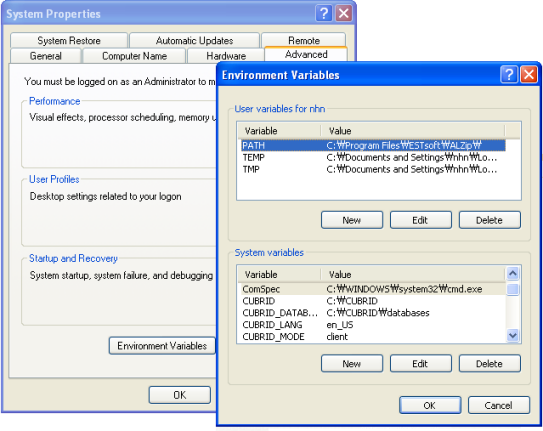
For Linux
If the CoraDB system has been installed on Linux, the installation program automatically creates the .coradb.sh or .coradb.csh file and makes configurations so that the files are automatically called from the installation account’s shell log-in script. The following is the contents of . coradb.sh environment variable configuration that was created in an environment that uses sh, bash, etc.
CoraDB=/home1/cora_user/CoraDB
CoraDB_DATABASES=/home1/cora_user/CoraDB/databases
ld_lib_path=`printenv LD_LIBRARY_PATH`

if [ "$ld_lib_path" = "" ]
then
    LD_LIBRARY_PATH=$CoraDB/lib
else
    LD_LIBRARY_PATH=$CoraDB/lib:$LD_LIBRARY_PATH
fi

SHLIB_PATH=$LD_LIBRARY_PATH
LIBPATH=$LD_LIBRARY_PATH
PATH=$CoraDB/bin:$CoraDB/coradbmanager:$PATH

export CoraDB
export CoraDB_DATABASES
export LD_LIBRARY_PATH
export SHLIB_PATH
export LIBPATH
export PATH
Language & Charset Setting
The language and the charset that will be used in the CoraDB DBMS is specified after the database name when DB is created(e.g. coradb createdb testdb ko_KR.utf8). The following are examples of values that can currently be set as a language and a charset.
en_US.iso88591: English ISO-88591 encoding(.iso88591 can be omitted)
ko_KR.euckr: Korean EUC-KR encoding
ko_KR.utf8: Korean UTF-8 encoding(.utf8 can be omitted)
de_DE.utf8: German UTF-8 encoding
es_ES.utf8: Spanish UTF-8 encoding
fr_FR.utf8: French UTF-8 encoding
it_IT.utf8: Italian UTF-8 encoding
ja_JP.utf8: Japanese UTF-8 encoding
km_KH.utf8: Cambodian UTF-8 encoding
tr_TR.utf8: Turkish UTF-8 encoding(.utf8 can be omitted)
vi_VN.utf8: Vietnamese UTF-8 encoding
zh_CN.utf8: Chinese UTF-8 encoding
ro_RO.utf8: Romanian UTF-8 encoding
Language and charset setting of CoraDB affects read and write data. The language is used for messages displayed by the program.
For more details related to charset, locale and collation settings, see An Overview of Globalization.
Port Setting
If ports are closed, the ports used by CoraDB should be opened.
The following table summarizes the ports used by CoraDB. Each port on the listener that waits for connection from the opposite side should be opened.
To open the ports for a specific process on the Linux firewall, follow the guide described for the corresponding firewall program.
If available ports for Windows are used, you cannot know which port will be opened. In this case, enter “firewall” in the “Control Panel” of the Windows menu and then choose “Windows Firewall> Allow a program or functionality through Windows Firewall” and then add the program for which port should be opened.
This method can be used for the case that it is difficult to specify a specific port in Windows. This method is recommended since it is safer to add a program to the Allowed programs list than to open a port without specifying a program on the Windows firewall.
Add “%CoraDB%\bin\cora_broker.exe” to open all ports for cora_broker.
Add “%CoraDB%\bin\cora_cas.exe” to open all ports for CAS.
Add “%CoraDB%\bin\cora_master.exe” to open all ports for cora_master.
Add “%CoraDB%\bin\cora_server.exe” to open all ports for cora_server.
Add “%CoraDB%\bin\cora_cmserver.exe” to open all ports for the CoraDB Manager.
Add “%CoraDB%\bin\cora_javasp.exe” to open all ports for the CoraDB Java SP server.
If you use CoraDB for Linux at the broker machine or the DB server machine, all of Linux ports should be opened. If you use CoraDB for Windows at the broker machine or the DB server machine, all of Linux ports should be opened or the related processes should be added to the program list allowed for the Windows firewall.
(*): The machine which has the CAS, CORASQL, copylogdb, or applylogdb process
(**): The machine which has the cora_server
The detailed description on each classification is given as follows.
Default Ports for CoraDB
The following table summarizes the ports required for each OS, based on the listening processes. Each port on the listener should be opened.
(*): The machine which has the CAS or CORASQL process
(**): The machine which has the cora_server
Note
In Windows, you cannot specify the ports to open because CAS randomly specifies the ports as accessing the cora_server. In this case, add “%CoraDB%\bin\cora_server.exe” to “Windows Firewall > Allowed programs”.
As the server process (cora_server) and the client processes (CAS, CORASQL) cross-check if the opposite node is normally running or not by using the ECHO(7) port, you should open the ECHO(7) port if there is a firewall. If the ECHO port cannot be opened for both the server and the client, set the check_peer_alive parameter value of the coradb.conf to none.
The relation of connection between processes is as follows:
application - cora_broker
            -> CAS  -  cora_master
                    -> cora_server
application: The application process
cora_broker: The broker server process. It selects CAS to connect with the application.
CAS: The broker application server process. It relays the application and the cora_server.
cora_master: The master process. It selects the cora_server to connect with the CAS.
cora_server: The database server process
The symbols of relation between processes and the meaning are as follows:
- : Indicates that the connection is made only once for the initial.
->, <- : Indicates that the connection is maintained. The right side of -> or the left side of <- is the party that the arrow symbol indicates. The party that the arrow symbol indicates is the listener which listens to the opposite process.
(master): Indicates the master node in the HA configuration.
(slave): Indicates the slave node in the HA configuration.
The connection process between the application and the DB is as follows:
The application tries to connect to the cora_broker through the broker port (BROKER_PORT) set in the coradb_broker.conf.
The cora_broker selects a connectable CAS.
The application and CAS are connected.
In Linux, BROKER_PORT, which is used as an application, is connected to CAS through the Unix domain socket. In Windows, since the Unix domain socket cannot be used, an application and CAS are connected through a port of which the number is the sum of the corresponding CAS ID and the APPL_SERVER_PORT value set in the coradb_broker.conf. If the APPL_SERVER_PORT value has not been set, the port value connected to the first CAS is BROKER_PORT + 1.
For example, if the BROKER_PORT is 33000 and the APPL_SERVER_PORT value has not been set in Windows, the ports used between the application and CAS are as follows:
The port used to connect the application to the CAS(1): 33001
The port used to connect the application to the CAS(2): 33002
The port used to connect the application to the CAS(3): 33003
CAS sends a request of connecting with the cora_server to the cora_master through the coradb_port_id port set in the coradb.conf.
CAS and the cora_server are connected.
In Linux, you should use the coradb_port_id port as CAS is connected to the cora_server through the Unix domain socket. In Windows, CAS is connected to the cora_server through a random available port as the Unix domain socket cannot be used. If the DB server is running in Windows, a random available port is used between the broker machine and the DB server machine. In this case, note that the operation may not be successful if a firewall blocks the port for the process between the two machines.
After that, CAS keeps connection with the cora_server even if the application is terminated until the CAS restarts.
Ports for CoraDB HA
The CoraDB HA is supported in Linux only.
The following table summarizes the ports required for each OS, based on the listening processes. Each port on the listener should be opened.
(*): The machine which has the CAS, CORASQL, copylogdb, or applylogdb process
(**): The machine which has the cora_server
As the server process (cora_server) and the client processes (CAS, CORASQL, copylogdb, applylogdb, etc.) cross-check if the opposite node is normally running or not by using the ECHO(7) port, you should open the ECHO(7) port if there is a firewall. If the ECHO port cannot be opened for both the server and the client, set the ref:check_peer_alive <check_peer_alive> parameter value of the coradb.conf to none.
The relation of connection between processes is as follows:
application - cora_broker
            -> CAS  -  cora_master(master) <-> cora_master(slave)
                    -> cora_server(master)     cora_server(slave) <- applylogdb(slave)
                                          <----------------------- copylogdb(slave)
cora_master(master): the master process on the master node in the CoraDB HA configuration. It checks if the peer node is alive.
cora_master(slave): the master process on the slave node in the CoraDB HA configuration. It checks if the peer node is alive.
copylogdb(slave): the process which copies the replication log on the slave node in the CoraDB HA configuration
applylogdb(slave): the process which applies the replication log on the slave node in the CoraDB HA configuration
For easy understanding for the replication process from the master node to the slave node, the applylogdb and copylogdb on the master node and CAS on the slave node have been omitted.
The symbols of relation between processes and the meaning are as follows:
- : Indicates that the connection is made only once for the initial.
->, <- : Indicates that the connection is maintained. The right side of -> or the left side of <- is the party that the arrow symbol indicates. The party that the arrow symbol indicates is the listener which listens to the opposite process.
(master): Indicates the master node in the HA configuration.
(slave): Indicates the slave node in the HA configuration.
The connection process between the application and the DB is identical with Default Ports for CoraDB. This section describes the connection process between the master node and the slave node when the master DB and the slave DB are configured 1:1 by the CoraDB HA.
The ha_port_id set in the coradb_ha.conf is used between the cora_master(master) and the cora_master(slave).
The copylogdb(slave) sends a request for connecting with the master DB to the cora_master(master) through the port set in the coradb_port_id of the coradb.conf on the slave node. Finally, the copylogdb(slave) is connected with the cora_server(master).
The applylogdb(slave) sends a request for connecting with the slave DB to the cora_master(slave) through the port set in the coradb_port_id of the coradb.conf on the slave node. Finally, the applylogdb(slave) is connected with the cora_server(slave).
On the master node, the applylogdb and the copylogdb run for the case that the master node is switched to the slave node.
Ports for CoraDB Manager Server
The following table summarizes the ports, based on the listening processes, used for CoraDB Manager server. The ports are identical regardless of the OS type.
Listener |
Requester |
Port |
Firewall Port Setting |
|---|---|---|---|
Manager server |
application |
8001 |
Open |
The port used when the CoraDB Manager client accesses the CoraDB Manager server process is cm_port of the cm.conf. The default value is 8001.
Ports for CoraDB Java Stored Procedure Server
The following table summarizes the ports, based on the listening processes, used for CoraDB Java Stored Procedure (Java SP) server. The ports are identical regardless of the OS type.
The port is used when the CAS relays between Java SP server (cora_javasp) and cora_server, which CAS receives a call of the java stored procedure from cora_server and then CAS passed the call to the CoraDB Java SP server process through java_stored_procedure_port of coradb.conf.
The default value of java_stored_procedure_port is 0, which means a random available port is assigned.