ADO.NET Driver
ADO.NET is a set of classes that expose data access services to the .NET programmer. ADO.NET provides a rich set of components for creating distributed, data-sharing applications. It is an integral part of the .NET Framework, providing access to relational, XML, and application data. ADO.NET supports a variety of development needs, including the creation of front-end database clients and middle-tier business objects used by applications, tools, languages, or Internet browsers.
Installing and Configuring ADO.NET
Requirements
Windows (Windows Vista or Windows 7 recommended)
.NET Framework 2.0 or later (4.0 or later versions recommended)
Microsoft Visual Studio Express edition ( https://visualstudio.microsoft.com/ )
Installing and Configuring CoraDB ADO.NET Driver
Before you start developing .NET applications with CoraDB, you will need the CoraDB ADO.NET Data Provider library (CoraDB.Data.dll). You have the options to:
Download the complied library along with other files from:
Compile it yourself from source code. You can download the source code from GitHub.
The CoraDB .NET Data Provider is 100% full-managed .NET code and it does not rely on any CoraDB library files. This means that the usage of the driver does not require any kind of CoraDB installation or files on the local machine.
The easiest way to install CoraDB ADO.NET Data Provider is to use the official installer. If you choose to install using the default option (x86), the driver will be installed in the Program Files\CoraDB\CoraDB ADO.NET Data Provider 8.4.1 directory.
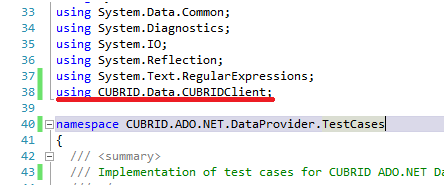
You can also choose to install the driver in GAC ( https://en.wikipedia.org/wiki/Global_Assembly_Cache ). The best way to install the driver is to use the tlbimp ( https://docs.microsoft.com/en-us/previous-versions/dotnet/netframework-2.0/tt0cf3sx(v=vs.80) ) tool. See the below to import the required namespaces.
ADO.NET Programming
A Simple Query/Retrieve Code
Let’s take a look at a simple code which retrieves value from a CoraDB database table. Assume that the connection is already established.
String sql = "select * from nation order by `code` asc";

using (CoraDBCommand cmd = new CoraDBCommand(sql, conn))
{
    using (DbDataReader reader = cmd.ExecuteReader())
    {
        reader.Read();
        //(read the values using: reader.Get...() methods)
    }
}
Once you have created the DbDataReader object, all you have to do is to use the Get…() method to retrieve any column data. CoraDB ADO.NET driver implements all methods required to read any CoraDB data types.
reader.GetString(3)
reader.GetDecimal(1)
The Get…() method will use as an input parameter the 0-based index position of the retrieved column.
To retrieve specific CoraDB data types, you need to use CoraDBDataReader, instead of the DbDataReader interface.
using (CoraDBCommand cmd = new CoraDBCommand("select * from t", conn))
{
    CoraDBDataReader reader = (CoraDBDataReader)cmd.ExecuteReader();

    reader.Read();
    Debug.Assert(reader.GetDateTime(0) == newDateTime(2008, 10, 31, 10, 20, 30, 040));
    Debug.Assert(reader.GetDate(0) == "2008-10-31");
    Debug.Assert(reader.GetDate(0, "yy/MM/dd") == "08-10-31");
    Debug.Assert(reader.GetTime(0) == "10:20:30");
    Debug.Assert(reader.GetTime(0, "HH") == "10");
    Debug.Assert(reader.GetTimestamp(0) == "2008-10-31 10:20:30.040");
    Debug.Assert(reader.GetTimestamp(0, "yyyy HH") == "2008 10");
}
batch Commands
When using CoraDB ADO.NET Data Provider library, you can execute more than one query against the data service in a single batch. For more information, see https://docs.microsoft.com/en-us/previous-versions/dd744839(v=vs.90) .
For example, in CoraDB, you can write the code like:
string[] sql_arr = newstring3;
sql_arr0 = "insert into t values(1)";
sql_arr1 = "insert into t values(2)";
sql_arr2 = "insert into t values(3)";
conn.BatchExecute(sql_arr);
or you can write as follows:
string[] sqls = newstring3;
sqls0 = "create table t(id int)";
sqls1 = "insert into t values(1)";
sqls2 = "insert into t values(2)";

conn.BatchExecuteNoQuery(sqls);
Connection String
In order to establish a connection from .NET application to CoraDB, you must build the database connection string as the following format:
ConnectionString = "server=<server address>;database=<database name>;port=<port number to use for connection to broker>;user=<user name>;password=<user password>;"
All parameters are mandatory except for port. If you do not specify the broker port number, the default value is 30,000.
The examples of connection string with different options are as follows:
Connect to a local server, using the default demodb database.
ConnectionString = "server=127.0.0.1;database=demodb;port=30000;user=public;password="
Connect to a remote server, using the default demodb database, as user dba.
ConnectionString = "server=10.50.88.1;database=demodb;user=dba;password="
Connect to a remote server, using the default demodb database, as user dba, using password secret.
ConnectionString = "server=10.50.99.1;database=demodb;port=30000;user=dba;password=secret"
As an alternative, you can use the CoraDBConnectionStringBuilder class to build easily a connection string in the correct format.
CoraDBConnectionStringBuilder sb = new CoraDBConnectionStringBuilder(localhost,"33000","demodb","public","");
using (CoraDBConnection conn = new CoraDBConnection(sb.GetConnectionString()))
{
    conn.Open();
}
or you can write as follows:
sb = new CoraDBConnectionStringBuilder();
sb.User = "public" ;
sb.Database = "demodb";
sb.Port = "33000";
sb.Server = "localhost";
using (CoraDBConnection conn = new CoraDBConnection(sb.GetConnectionString()))
{
    conn.Open();
}
Note
The database connection in thread-based programming must be used independently each other.
CoraDB Collections
Collections are specific CoraDB data type. If you are not familiar with them, you can read information in Collection Types. Because collections are not common to any database, the support for them is implemented in some specific CoraDB collection method.
public void AddElementToSet(CoraDBOid oid, String attributeName, Object value)
public void DropElementInSet(CoraDBOid oid, String attributeName, Object value)
public void UpdateElementInSequence(CoraDBOid oid, String attributeName, int index, Object value)
public void InsertElementInSequence(CoraDBOid oid, String attributeName, int index, Object value)
public void DropElementInSequence(CoraDBOid oid, String attributeName, int index)
public int GetCollectionSize(CoraDBOid oid, String attributeName)
Here below are two examples of using these CoraDB extensions.
Reading values from a Collection data type:
using (CoraDBCommand cmd = new CoraDBCommand("SELECT * FROM t", conn))
{
    using (DbDataReader reader = cmd.ExecuteReader())
    {
        while (reader.Read())
        {
            object[] o = (object[])reader0;
            for (int i = 0; i <SeqSize; i++)
            {
                //...
            }
        }
    }
}
Updating a Collection data type:
conn.InsertElementInSequence(oid, attributeName, 5, value);
SeqSize = conn.GetCollectionSize(oid, attributeName);
using (CoraDBCommand cmd = new CoraDBCommand("SELECT * FROM t", conn))
{
    using (DbDataReader reader = cmd.ExecuteReader())
    {
        while (reader.Read())
        {
            int[] expected = { 7, 1, 2, 3, 7, 4, 5, 6 };
            object[] o = (object[])reader0;
        }
    }
}
conn.DropElementInSequence(oid, attributeName, 5);
SeqSize = conn.GetCollectionSize(oid, attributeName);
CoraDB BLOB/CLOB
Starting from CoraDB 2008 R4.0 (8.4.0), CoraDB deprecated the GLO data type and added support for LOB (BLOB, CLOB) data types. These data types are specific CoraDB data types so you need to use methods offered by CoraDB ADO.NET Data Provider.
Here are some basic source code examples.
Reading BLOB data:
CoraDBCommand cmd = new CoraDBCommand(sql, conn);
DbDataReader reader = cmd.ExecuteReader();

while (reader.Read())
{
    CoraDBBlob bImage = (CoraDBBlob)reader0;
    byte[] bytes = newbyte(int)bImage.BlobLength;
    bytes = bImage.getBytes(1, (int)bImage.BlobLength);
    //...
}
Updating CLOB data:
string sql = "UPDATE t SET c = ?";
CoraDBCommand cmd = new CoraDBCommand(sql, conn);

CoraDBClobClob = new CoraDBClob(conn);
str = conn.ConnectionString; //Use the ConnectionString for testing

Clob.setString(1, str);

CoraDBParameter param = new CoraDBParameter();

param.ParameterName = "?";
param.CoraDBDataType = CoraDBDataType.CCI_U_TYPE_CLOB;
param.Value = Clob;

cmd.Parameters.Add(param);
cmd.ExecuteNonQuery();
CoraDB Metadata Support
CoraDB ADO.NET Data Provider supports for database metadata. Most of these methods are implemented in the CoraDBSchemaProvider class. .. code-block:: c#
public DataTable GetDatabases(string[] filters) public DataTable GetTables(string[] filters) public DataTable GetViews(string[] filters) public DataTable GetColumns(string[] filters) public DataTable GetIndexes(string[] filters) public DataTable GetIndexColumns(string[] filters) public DataTable GetExportedKeys(string[] filters) public DataTable GetCrossReferenceKeys(string[] filters) public DataTable GetForeignKeys(string[] filters) public DataTable GetUsers(string[] filters) public DataTable GetProcedures(string[] filters) public static DataTable GetDataTypes() public static DataTable GetReservedWords() public static String[] GetNumericFunctions() public static String[] GetStringFunctions() public DataTable GetSchema(string collection, string[] filters)
The example below shows how to get the list of tables in the current CoraDB database.
CoraDBSchemaProvider schema = new CoraDBSchemaProvider(conn);
DataTable dt = schema.GetTables(newstring[] { "%" });

Debug.Assert(dt.Columns.Count == 3);
Debug.Assert(dt.Rows.Count == 10);

Debug.Assert(dt.Rows00.ToString() == "demodb");
Debug.Assert(dt.Rows01.ToString() == "demodb");
Debug.Assert(dt.Rows02.ToString() == "stadium");

Get the list of Foreign Keys in a table:

CoraDBSchemaProvider schema = new CoraDBSchemaProvider(conn);
DataTable dt = schema.GetForeignKeys(newstring[] { "game" });

Debug.Assert(dt.Columns.Count == 9);
Debug.Assert(dt.Rows.Count == 2);

Debug.Assert(dt.Rows00.ToString() == "athlete");
Debug.Assert(dt.Rows01.ToString() == "code");
Debug.Assert(dt.Rows02.ToString() == "game");
Debug.Assert(dt.Rows03.ToString() == "athlete_code");
Debug.Assert(dt.Rows04.ToString() == "1");
Debug.Assert(dt.Rows05.ToString() == "1");
Debug.Assert(dt.Rows06.ToString() == "1");
Debug.Assert(dt.Rows07.ToString() == "fk_game_athlete_code");
Debug.Assert(dt.Rows08.ToString() == "pk_athlete_code");
The example below shows how to get the list of indexes in a table.
CoraDBSchemaProvider schema = new CoraDBSchemaProvider(conn);
DataTable dt = schema.GetIndexes(newstring[] { "game" });

Debug.Assert(dt.Columns.Count == 9);
Debug.Assert(dt.Rows.Count == 5);

Debug.Assert(dt.Rows32.ToString() == "pk_game_host_year_event_code_athlete_code"); //Index name
Debug.Assert(dt.Rows34.ToString() == "True"); //Is it a PK?
DataTable Support
The DataTable is a central object in the ADO.NET library and CoraDB ADO.NET Data Provider support the following features.
DataTable populate
Built-in commands: INSERT, UPDATE, and DELETE
Column metadata/attributes
The following example shows how to get columns attributes.
String sql = "select * from nation";
CoraDBDataAdapter da = new CoraDBDataAdapter();
da.SelectCommand = new CoraDBCommand(sql, conn);
DataTable dt = newDataTable("nation");
da.FillSchema(dt, SchemaType.Source);//To retrieve all the column properties you have to use the FillSchema() method

Debug.Assert(dt.Columns0.ColumnName == "code");
Debug.Assert(dt.Columns0.AllowDBNull == false);
Debug.Assert(dt.Columns0.DefaultValue.ToString() == "");
Debug.Assert(dt.Columns0.Unique == true);
Debug.Assert(dt.Columns0.DataType == typeof(System.String));
Debug.Assert(dt.Columns0.Ordinal == 0);
Debug.Assert(dt.Columns0.Table == dt);
The following example shows how to insert values into a table by using the INSERT statement.
String sql = " select * from nation order by `code` asc";
using (CoraDBDataAdapter da = new CoraDBDataAdapter(sql, conn))
{
    using (CoraDBDataAdapter daCmd = new CoraDBDataAdapter(sql, conn))
    {
        CoraDBCommandBuildercmdBuilder = new CoraDBCommandBuilder(daCmd);
        da.InsertCommand = cmdBuilder.GetInsertCommand();
    }

    DataTable dt = newDataTable("nation");
    da.Fill(dt);

    DataRow newRow = dt.NewRow();

    newRow"code" = "ZZZ";
    newRow"name" = "ABCDEF";
    newRow"capital" = "MyXYZ";
    newRow"continent" = "QWERTY";

    dt.Rows.Add(newRow);
    da.Update(dt);
}
Transactions
CoraDB ADO.NET Data Provider implements support for transactions in a similar way with direct-SQL transactions support. Here is a code example showing how to use transactions.
conn.BeginTransaction();

string sql = "create table t(idx integer)";
using (CoraDBCommand command = new CoraDBCommand(sql, conn))
{
    command.ExecuteNonQuery();
}

conn.Rollback();

conn.BeginTransaction();

sql = "create table t(idx integer)";
using (CoraDBCommand command = new CoraDBCommand(sql, conn))
{
    command.ExecuteNonQuery();
}

conn.Commit();
Working with Parameters
In CoraDB, there is no support for named parameters, but only for position-based parameters. Therefore, CoraDB ADO.NET Data Provider provides support for using position-based parameters. You can use any name you want as long as parameters are prefixed with the character a question mark (?). Remember that you must declare and initialize them in the correct order.
The example below shows how to execute SQL statements by using the parameters. The most important thing is the order in which the Add () methods are called.
using (CoraDBCommand cmd = new CoraDBCommand("insert into t values(?, ?)", conn))
{
    CoraDBParameter p1 = new CoraDBParameter("?p1", CoraDBDataType.CCI_U_TYPE_INT);
    p1.Value = 1;
    cmd.Parameters.Add(p1);

    CoraDBParameter p2 = new CoraDBParameter("?p2", CoraDBDataType.CCI_U_TYPE_STRING);
    p2.Value = "abc";
    cmd.Parameters.Add(p2);

    cmd.ExecuteNonQuery();
}
Error Codes and Messages
The following list displays the error code and messages shown up when using CoraDB ADO.NET Data Provider.
Code Number |
Error Code |
Error Message |
|---|---|---|
0 |
ER_NO_ERROR |
“No Error” |
1 |
ER_NOT_OBJECT |
“Index’s Column is Not Object” |
2 |
ER_DBMS |
“Server error” |
3 |
ER_COMMUNICATION |
“Cannot communicate with the broker” |
4 |
ER_NO_MORE_DATA |
“Invalid dataReader position” |
5 |
ER_TYPE_CONVERSION |
“DataType conversion error” |
6 |
ER_BIND_INDEX |
“Missing or invalid position of the bind variable provided” |
7 |
ER_NOT_BIND |
“Attempt to execute the query when not all the parameters are binded” |
8 |
ER_WAS_NULL |
“Internal Error: NULL value” |
9 |
ER_COLUMN_INDEX |
“Column index is out of range” |
10 |
ER_TRUNCATE |
“Data is truncated because receive buffer is too small” |
11 |
ER_SCHEMA_TYPE |
“Internal error: Illegal schema paramCoraDBDataType” |
12 |
ER_FILE |
“File access failed” |
13 |
ER_CONNECTION |
“Cannot connect to a broker” |
14 |
ER_ISO_TYPE |
“Unknown transaction isolation level” |
15 |
ER_ILLEGAL_REQUEST |
“Internal error: The requested information is not available” |
16 |
ER_INVALID_ARGUMENT |
“The argument is invalid” |
17 |
ER_IS_CLOSED |
“Connection or Statement might be closed” |
18 |
ER_ILLEGAL_FLAG |
“Internal error: Invalid argument” |
19 |
ER_ILLEGAL_DATA_SIZE |
“Cannot communicate with the broker or received invalid packet” |
20 |
ER_NO_MORE_RESULT |
“No More Result” |
21 |
ER_OID_IS_NOT_INCLUDED |
“This ResultSet do not include the OID” |
22 |
ER_CMD_IS_NOT_INSERT |
“Command is not insert” |
23 |
ER_UNKNOWN |
“Error” |